TradingView Alternatives for Forex Analysis
TradingView is great but expensive. Explore the best alternatives for forex technical analysis — from multi-timeframe charting to automated pair scanning tools.
Published on 4 June 2026
TradingView is the dominant charting platform for retail forex traders, and for good reason. Its charts are clean, its indicator library is extensive, and its community of shared scripts and ideas is genuinely useful. For a trader who wants to open a chart and draw lines, it is hard to beat.
But dominance does not mean it is the right tool for every use case. TradingView is a charting platform — it is built around the experience of looking at one chart at a time. For traders whose primary workflow is scanning multiple pairs across multiple timeframes to identify which setups are forming right now, that one-chart-at-a-time architecture creates a real bottleneck. The platform can display multiple charts simultaneously, but checking indicator conditions across 20 pairs and 4 timeframes still requires opening 80 individual chart configurations manually.
This guide covers the main TradingView alternatives for forex traders, what each one does well, and the specific use cases where dedicated tools outperform TradingView's general-purpose approach.
What TradingView Does Well
Before covering alternatives, it is worth being precise about TradingView's genuine strengths — because the right alternative depends on which of TradingView's strengths you need and which you can trade off.
Charting depth. TradingView's chart interface is polished, fast, and highly customisable. Drawing tools are comprehensive. Chart templates save and restore indicator configurations. The replay mode for backtesting setups on historical data is genuinely useful.
Indicator library. Pine Script allows community members to build and share custom indicators. The library contains thousands of scripts covering virtually every technical analysis concept imaginable. For traders who want a specific, unusual indicator, TradingView's community scripts are often the only place to find it without building it from scratch.
Multi-asset coverage. TradingView covers forex, crypto, stocks, indices, futures, and commodities through a single interface. For traders who operate across asset classes, this breadth is valuable.
Alerts. TradingView's alert system is flexible and supports conditions on virtually any indicator or price level. Alerts can be delivered via app notification, email, or webhook. For traders who need to be notified when a specific condition is met on a specific pair, this is a significant capability.
Where it falls short: TradingView is designed for depth on a single chart, not breadth across many charts simultaneously. Its screening tools are limited compared to dedicated scanners. The free tier is heavily restricted. And the price — $14.95/month for the Essential plan or $29.95/month for Plus — is significant for a tool whose primary function for many traders is checking indicator conditions they could check elsewhere.
| Tool | Price/Month | Asset Coverage | Multi-TF Scanner | Chart Quality | Best For |
|---|---|---|---|---|---|
| TradingView | $0–$60 | Forex, crypto, stocks, futures | Limited (manual) | Excellent | Single-chart deep analysis |
| Scanvey | Free | Forex (30 pairs), Crypto (30 pairs) | Yes (automated) | Clean | Multi-pair multi-TF scanning |
| MetaTrader 4/5 | Free | Forex, CFDs | No (manual/EA) | Functional | Execution + basic analysis |
| cTrader | Free | Forex, CFDs | No | Modern | ECN execution quality |
| ProRealTime | €0–€30 | Forex, stocks, futures | Yes (ProScreener) | High | Custom multi-condition screens |
Alternative 1 — MetaTrader 4 / MetaTrader 5
MetaTrader remains the most widely used trading platform globally, primarily because most retail forex brokers offer it as their standard execution platform.
What it does well: MT4 and MT5 are execution-first platforms — they connect directly to your broker, execute trades, and manage positions. For traders who want analysis and execution in a single interface, this integration is valuable. MT4's Expert Advisors (automated trading scripts) and custom indicator system are extensively documented and have a large development community. MT5 adds support for more asset classes, depth of market data, and an improved scripting language.
The limitations for analysis: MetaTrader's charting interface is functional but dated compared to TradingView. The indicator library, while large, requires more technical knowledge to access than TradingView's community scripts. Multi-chart workspaces exist but are less intuitive to configure. And crucially, MetaTrader has no native multi-pair scanning capability — checking conditions across many pairs requires either custom Expert Advisors or manual chart-by-chart review.
Best for: Traders who need execution integrated with analysis, algorithmic traders building automated strategies, and traders whose broker only offers MetaTrader.
Alternative 2 — cTrader
cTrader is the primary competitor to MetaTrader in the retail forex execution platform space, used by a growing number of ECN brokers.
What it does well: cTrader's interface is significantly more modern than MetaTrader's. Charting is cleaner, order execution has more precision (partial fills, true market depth), and the cAlgo algorithmic trading framework is more developer-friendly than MQL4/5. The platform has genuine multi-timeframe chart support and a reasonable built-in indicator library.
The limitations: Like MetaTrader, cTrader is execution-first and lacks dedicated multi-pair scanning. It is only available through brokers that support the platform — fewer than MetaTrader's nearly universal broker compatibility. And its community and indicator ecosystem, while growing, is significantly smaller than MetaTrader's.
Best for: Active traders seeking better execution quality than MetaTrader, particularly those using ECN brokers.
Alternative 3 — ProRealTime
ProRealTime is a professional charting platform widely used in Europe, offered free through several brokers (IG, Saxo, and others) with full access to real-time data.
What it does well: ProRealTime's screening tools are its standout feature. The ProScreener tool allows traders to build custom scans across multiple instruments using indicator conditions — a capability that TradingView's native tools do not match at this level of sophistication. For traders who want to run complex multi-condition screens across a large instrument universe, ProRealTime is a genuine step up from TradingView.
Charting quality is high, and the indicator library — while smaller than TradingView's — includes all standard technical analysis tools. The platform is available as a web interface or a downloadable application.
The limitations: Free access is conditional on minimum monthly trading activity through the partner broker. Full real-time data (without broker dependency) requires a subscription starting at €30/month. The community and script-sharing ecosystem is much smaller than TradingView's. The interface has a steeper learning curve.
Best for: Active traders already using an IG or Saxo account who want professional-grade screening tools, particularly for equity and futures markets where ProRealTime's coverage is strongest.
Alternative 4 — Coinigy / Crypto-specific Platforms
For traders whose focus is primarily crypto assets, Coinigy and similar crypto-native platforms offer multi-exchange aggregated charting with real-time data from Binance, KuCoin, Coinbase, and dozens of other exchanges in a single interface.
What it does well: Portfolio tracking across exchanges, multi-exchange order execution, real-time crypto data aggregation. For traders managing crypto positions across multiple exchanges who need a unified view, this is valuable.
The limitations: Coverage is crypto-only — no forex, no equities. Technical analysis toolset is functional but narrower than TradingView. The value proposition is primarily the multi-exchange aggregation, not the charting sophistication. Pricing is comparable to TradingView for the full-featured plan.
Best for: Traders whose primary focus is spot crypto trading across multiple exchanges.
Alternative 5 — Dedicated Multi-Timeframe Matrix Scanners
This is the category where a specific gap in TradingView's architecture creates the most compelling case for an alternative.
The use case: a forex trader wants to know, right now, which pairs have their MA50 above their MA200 on D1 — the exact multi-timeframe scanning process covered in our complete guide, RSI above 50 on both D1 and H4, MACD histogram positive on H4, and Ichimoku cloud confirming the direction. On TradingView, answering this question requires opening approximately 80 chart configurations (20 pairs × 4 timeframes) and checking each one manually. Even with saved templates and layouts, this takes 20–40 minutes.
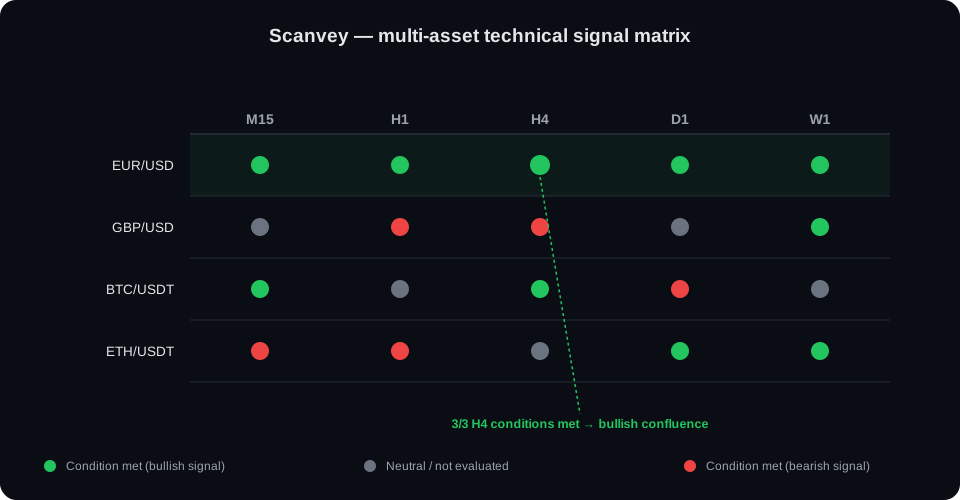
A matrix scanner inverts this workflow. Instead of opening each chart to check conditions, it presents all conditions for all pairs across all timeframes in a single grid view. The trader scans a column to see which pairs have RSI above 50 on D1, scans another column for H4 MACD direction, and identifies pairs with multi-timeframe alignment in under two minutes. The 20-to-80-chart manual process — detailed in our guide to scanning forex pairs efficiently — is compressed into a single screen. This is a scanner in a specific sense, distinct from a one-time screener query — see Forex Scanner vs Forex Screener if the distinction is unfamiliar.
Scanvey is built specifically around this workflow. The matrix displays MA crossover status, RSI level, MACD direction, and Ichimoku cloud position for all forex pairs and crypto assets across all timeframes simultaneously. The result is a fundamentally different analytical experience: instead of working through charts sequentially, you see the full opportunity set in a single view and direct manual analysis only where conditions are already aligned.
This matters most for traders who run a systematic multi-indicator, multi-timeframe scanning process — precisely the process described across this blog. Checking 5 indicator conditions on 20 pairs across 4 timeframes is 400 individual data points. Scanvey displays all 400 simultaneously. TradingView requires you to check them one chart at a time.
How to Choose the Right Tool for Your Workflow
The right tool depends on what your analytical workflow actually requires.
If your primary need is deep single-chart analysis: TradingView remains the strongest option. Its charting tools, indicator library, and drawing capabilities are unmatched at the retail level. The Pine Script community means almost any indicator you want already exists as a free script.
If you need execution integrated with analysis: MetaTrader or cTrader, depending on your broker. The execution integration justifies accepting the weaker charting experience.
If you need professional-grade custom screening: ProRealTime (if you are an IG or Saxo client) or TradingView's screener (which is capable for equities, more limited for forex).
If your primary workflow is multi-pair, multi-timeframe condition scanning: A matrix scanner like Scanvey solves the problem that TradingView was not designed for. The question is not whether TradingView can check indicator conditions — it can — but whether opening 80 charts manually is the right way to do it for your daily process.
The most common configuration for systematic forex traders: Scanvey for the morning scan (identify which pairs have conditions aligned across timeframes), then TradingView for the detailed chart work on the shortlisted pairs (drawing levels, confirming candle patterns, setting alerts). The two tools are complementary rather than competing: one for breadth, one for depth.
The Cost Question
For many traders, the platform choice comes down partly to cost. Here is a realistic comparison:
TradingView: Free tier (limited, with ads), Essential $14.95/month, Plus $29.95/month, Premium $59.95/month. Real-time forex data requires at least the Essential tier.
MetaTrader 4/5: Free through brokers. No subscription cost.
cTrader: Free through supporting brokers. No subscription cost.
ProRealTime: Free with qualifying trading activity through partner brokers, or €30/month for independent real-time data access.
Scanvey: check current pricing at Scanvey — designed as an accessible alternative focused specifically on the matrix scanning workflow.
For traders paying TradingView Plus or Premium primarily to get real-time data and multi-chart layouts for a scanning workflow, the cost-benefit calculation deserves scrutiny. If the primary use case is scanning rather than deep single-chart analysis, a purpose-built scanner may provide more value at lower cost.
What No Tool Replaces
It is worth being clear about what no platform — TradingView or any alternative — can replace.
The judgment calls that determine trade quality are not in any dashboard. Assessing whether a support level is genuinely significant or a minor speed bump, reading the character of a pullback (orderly or chaotic), distinguishing a high-quality pin bar from a marginal one, evaluating whether a MACD histogram reversal has real momentum behind it — these require trained analytical judgment built through experience.
Tools compress the mechanical steps of analysis: checking conditions, identifying which pairs have specific indicator states, monitoring alerts. They make the process more efficient and more systematic. They do not provide the analytical insight that makes the information actionable.
The best workflow combines systematic tooling — for the scalable, mechanical parts — with focused human judgment — for the structural and entry assessment that determines whether a technically-qualified setup is actually worth trading. Neither alone is sufficient; the combination is what professional-grade forex analysis looks like in practice.
Conclusion
TradingView is not the right answer for every forex trader — it is the right answer for traders whose primary need is deep, single-chart analysis with an extensive indicator library. For traders whose primary workflow is systematic multi-pair, multi-timeframe condition scanning, its one-chart-at-a-time architecture creates an efficiency problem that dedicated scanning tools are built to solve.
The most effective setups are identified from broker relationships: the best analytical platform is the one that fits your actual daily process rather than the one with the most impressive feature list. Evaluate your workflow honestly — how much time do you spend on broad scanning versus deep single-chart analysis — and choose accordingly.
Related articles:
- Best Forex Analysis Tools 2026
- Manual vs Automated Forex Scanning
- How to Scan Forex Pairs Efficiently
- Multi-Timeframe Analysis: The Complete Guide
Frequently asked questions
What is the best TradingView alternative for forex analysis?
The best alternative depends on your specific workflow gap. For traders whose main frustration with TradingView is the cost of premium plans, cTrader (free) or MetaTrader 5 (free, broker-integrated) cover charting and basic analysis. For traders whose main frustration is the time spent manually checking conditions across many pairs and timeframes, a dedicated matrix scanner addresses a problem that TradingView — despite its many strengths — was not designed to solve efficiently.
Is there a free TradingView alternative for forex?
Yes — MetaTrader 4 and MetaTrader 5 are free through most retail forex brokers and provide full charting functionality with all major indicators. cTrader is also free with ECN brokers. For basic charting and indicator access, either platform covers the core analytical needs without cost. The free tier of TradingView itself (3 indicators per chart, 1 alert) is usable for basic analysis, though limiting for multi-layout workflows.
What TradingView alternative is best for scanning multiple pairs at once?
For multi-pair, multi-timeframe condition scanning, TradingView's architecture — built around one chart at a time — is the limitation, not the price. A matrix scanner purpose-built for this workflow displays indicator conditions for all pairs across all timeframes simultaneously, which is structurally different from TradingView's layout system. The two tools are complementary: matrix scanners for the discovery and filtering phase, TradingView for the detailed chart analysis on the shortlisted pairs.
Why do serious forex traders look for TradingView alternatives?
The most common reasons are: (1) the cost of the Pro+ or Premium plans relative to the features used, (2) the lack of an efficient multi-pair scanning view — checking 20 pairs across 4 timeframes still requires 80 manual chart checks even on TradingView Premium, and (3) broker integration — traders who execute directly from their charting platform need a tool connected to their broker, which MetaTrader or cTrader handles better than TradingView.
Further reading
These reference resources complement the analysis presented in this article:
Related reading
A scanner that complements your toolkit
Filter 60 assets before opening TradingView for deep chart analysis.
Try ScanveyThis article is for informational and educational purposes only. It does not constitute investment advice or a trading signal. Trading financial products involves a high risk of capital loss. Full risk disclaimer